
My Portfolio Is Also My Engineering Lab
June 25, 2026 - David ClintonRead this blog if you want to also turn a personal portfolio into a small engineering lab for yourself.
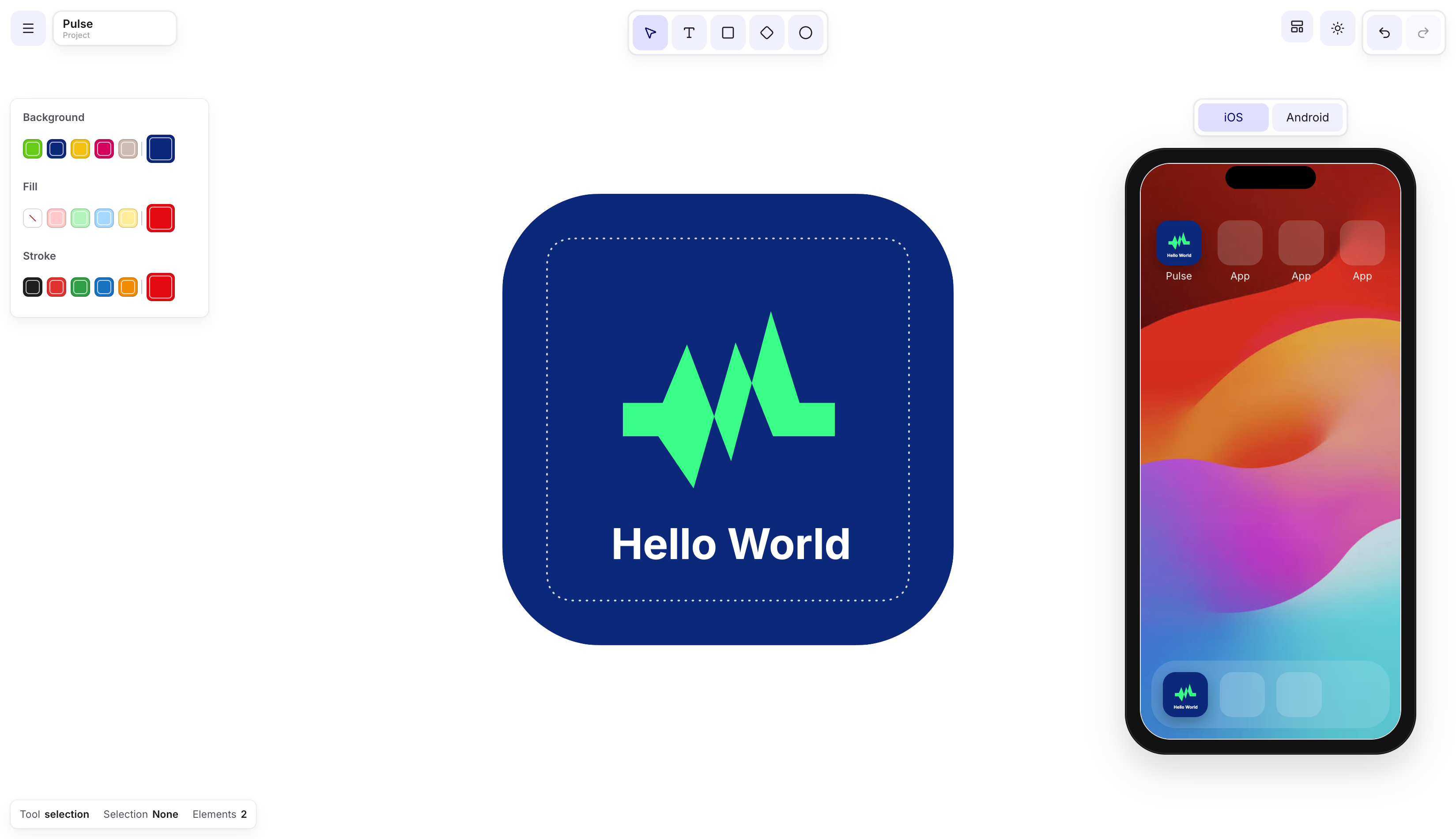
I have been using my personal site as a portfolio and blog then it turned into a small engineering lab.
That sounds more dramatic than it is. It is still a simple Next.js site with a blog, work page, contact page, RSS feed, sitemap, PWA behavior, and a Notion-powered content system. But the more I worked on it, the more I realized the site was doing something useful for me.
It gave me a place to test how I actually want to build.
One example is the asset generator I built inside this same codebase. It started as a small experiment for creating visual assets and testing interface ideas without spinning up a separate project. You can open the asset generator and play around with it here. I recorded a short walkthrough below because it shows the main point of this post better than a paragraph can: the portfolio is not just a finished surface, it is also where I try things.
Personal sites get stale because they are annoying to update
Most portfolio sites start with good intentions.
You redesign the homepage. You add a few projects. You write a short bio. You add links to GitHub, LinkedIn, maybe a blog. Then a few months pass and the site starts drifting away from you the owner.
And the problem is not usually skill. I think it is just your workflow, time and having too many projects.
If updating your site requires too many small steps, you stop doing it. If writing a blog post means opening your editor, creating files, checking frontmatter, importing images, validating routes, and redeploying, you will eventually avoid it.
I wanted the site to remove friction instead of creating it.
For me, that meant using Notion as the source of truth for blog content. I already think and draft in Notion. So the question became: why not make that the publishing interface?
Notion is the CMS, but the site owns the experience
The blog content lives in Notion.
The site reads from the Notion API using NOTION_TOKEN and NOTION_DATABASE_ID. Each article has the fields the frontend needs: title, slug, summary, published date, tags, cover image, and recommended reads. This gives me a clean split.
Notion owns writing. Next.js owns rendering.
That split matters. I do not want to design article pages inside a CMS. I want to write in a tool that feels fast, then let the site turn that content into a polished reading experience.
The hard part is the translation layer.
A Notion page is not a blog post. It is a tree of blocks. The site has to convert those blocks into something readers can actually use. The components are headings, paragraphs,** code blocks,** images, captions, bookmarks, internal links, recommended reads, metadata, and table of contents data.
That is where the project became interesting.
A blog is not just a list of posts
At first, a blog sounds simple. Fetch posts. Render posts. Add routes. Then you start adding everything a real blog needs:
None of these are individually impressive. Together, they make the difference between a page that displays text and a publishing system that feels reliable.
That is the part I like.
A personal site is small enough to move quickly, but complete enough to expose real product problems.
The site became my test bench
Once the blog was working, I started using the site for more than publishing.
I added experiments around animations. I worked on PWA behavior. I tested offline states. I added asset generation ideas. I improved SEO. I cleaned up article rendering. I wrote scripts for migrating and auditing content.
None of this required a giant roadmap.
It was more like noticing small points of friction and using the site to explore them.
-
Can I make publishing easier?
-
Can I make articles nicer to read?
-
Can I make social previews more reliable?
-
Can I make internal links smarter?
-
Can I test UI ideas without starting a new project?
-
Can I use AI to speed up the annoying parts without losing control of the system?
That is when the portfolio stopped being only a portfolio.
It became a place where I could practice product engineering in a controlled environment.
AI made the boring work cheaper
AI helped a lot.
Not because it magically understood the whole project, but because it made the repetitive parts cheaper. Drafting scripts, refactoring components, testing small rendering cases, exploring edge cases, and shaping article structure all became faster.
The important part is that AI did not decide the architecture.
It did not decide that Notion should be the source of truth. It did not decide how the article experience should feel. It did not decide what tradeoffs mattered.
It accelerated execution after I had a direction.
That distinction feels important. AI is very good at turning a clear intention into code. It is much worse when the intention is vague.
The better I got at defining the system, the more useful the agents became.
The real lesson is complexity has a carrying cost
Every feature adds weight.
A blog needs content. Content needs a source of truth. A source of truth needs a schema. A schema needs rendering rules. Rendering rules need tests or at least strong validation. Images need handling. Links need structure. Metadata needs consistency.
Complexity Budget Chart
| Feature | Value | Complexity Cost |
|---|---|---|
| Recommended reads | Better article discovery | Content relationships |
| Asset Generator | Experiment space | More UI state and controls |
| PWA | Offline/install behavior | Service worker lifecycle |
| RSS | Better distribution | Feed generation and metadata |
| Notion CMS | Easy writing flow | API/schema/rendering logic |
You can ignore this for a while. Then one day your personal site becomes hard to update, and you stop touching it.
That is what I wanted to avoid.
The point of the project was not to add every possible feature. The point was to build a system I would actually keep using.
Results
The result is a site that does more than introduce me.
It gives me a publishing workflow. It gives me a place to test frontend ideas. It gives me a home for technical writing. It gives me a small production system where I can practice the same decisions that show up in larger products.
This is why I like working on personal sites.
They are not impressive because of scale. They are useful because they compress the whole product loop into something one person can own.
You make a decision. You ship it. You feel the maintenance cost. You adjust. This feedback loop is hard to fake.
My portfolio is still a portfolio. But it is also where I experiment with the kind of engineering I care about: clear systems, fast workflows, thoughtful interfaces, and tools that reduce friction instead of creating more of it.